

Cloud migration is one of the most consequential moves a business can make. Organizations that get it right unlock real gains, elastic scalability, reduced hardware dependency, and the agility to compete faster. But the companies that struggle aren't always the ones that lack cloud ambition. More often, they're the ones who didn't account for what the journey actually costs.
The listed price of cloud services is only part of the equation. The real financial pain comes from the costs that don't show up in initial estimates, the ones that surface mid-migration or months after go-live. Without a properly built plan, what looks like a cost-saving transition can quietly become a budget overrun.
This guide walks through the most common hidden costs of on-prem to cloud migration, how each one catches organizations off guard, and what you can do to avoid them.
Understanding On-Prem to Cloud Migration Costs: A Complete Overview
Migrating from on-premises infrastructure to the cloud means shifting from a capital expenditure model (hardware, data center space, maintenance contracts) to a consumption-based one. That shift sounds straightforward on paper. In practice, it involves a layered set of one-time and ongoing costs that organizations routinely underestimate.
Key cost phases to plan for:
- Pre-migration: Infrastructure discovery, compatibility assessments, cloud architecture design, and hiring or upskilling staff
- During migration: Data transfer fees, application reconfiguration, testing environments, and the productivity cost of downtime or partial outages
- Post-migration: Ongoing compute and storage costs, backup and disaster recovery, security tooling, compliance maintenance, and cloud operations
The total spend depends on your migration strategy, lift-and-shift, re-platforming, or full modernization, as well as your data volumes, workload complexity, and compliance requirements. Organizations that treat migration as a one-time project rather than an ongoing operational shift tend to get blindsided the most.
The 7 Hidden Costs of On-Prem to Cloud Migration
1. Data Transfer and Egress Fees
Cloud providers charge for data in motion, particularly when moving large datasets from on-prem environments to the cloud, or when transferring data between cloud regions. For organizations with significant data volumes, these fees can accumulate quickly and are almost always underestimated in initial budgets.
The issue compounds post-migration. Egress charges don't stop at go-live; they continue every time data moves between services, regions, or providers. In multi-cloud architectures, this becomes a structural cost that grows with usage.
How to avoid it:
- Apply data compression and deduplication before migration to reduce transfer volumes
- Keep workloads and their data in the same cloud region wherever possible
- Map out your data flows in advance and model egress costs before committing to an architecture
- Use a managed migration service that accounts for these fees in the project plan rather than discovering them post-launch
2. Application Refactoring and Reengineering
Legacy applications were built for on-premises environments, dedicated hardware, fixed network configurations, and local storage. Many of them don't simply "lift" into the cloud. They require reconfiguration, partial rewrites or, in some cases, a complete rebuild to run reliably in a cloud-native context.
This is one of the most unpredictable cost categories. Compatibility issues often don't surface until testing is underway, and each one adds time and engineering cost to the timeline.
How to avoid it:
- Conduct a detailed application dependency mapping before migration begins — not during
- Prioritize applications with the cleanest cloud compatibility for early waves; tackle complex legacy workloads with more runway
- Consider retaining certain applications on-prem in a hybrid model while cloud-native equivalents are built in parallel
- For VMware-based workloads specifically, look for migration paths that convert VMs to cloud-native instances without requiring re-architecture. This alone can eliminate weeks of engineering effort
3. Over-Provisioning and Underutilized Cloud Resources
One of the most persistent post-migration surprises is the cloud bill that keeps climbing despite a supposedly completed migration. The culprit is almost always over-provisioning — teams that replicated their on-prem sizing into the cloud without right-sizing for actual workload demands.
Unlike on-premises infrastructure, where unused capacity sits idle but doesn't generate additional charges, cloud resources bill continuously. An oversized VM running at 10% utilization costs the same as one running at 90%.
Industry estimates suggest organizations overspend by 20–50% on cloud resources due to poor rightsizing and a lack of continuous visibility. That's not a rounding error; for mid-size enterprises, it can represent hundreds of thousands of dollars annually.
How to avoid it:
- Right-size instances based on actual workload data, not on-prem parity
- Implement autoscaling policies so resources expand and contract with real demand
- Use cloud cost monitoring tools that provide continuous visibility, not just monthly billing summaries
- Look for platforms that offer AI-driven rightsizing recommendations, idle resource detection, and cost anomaly alerts automatically, rather than requiring manual analysis
4. Security and Compliance Gaps
The security model changes fundamentally when you move to the cloud. In on-prem environments, the perimeter was physical: the data center walls, your firewall, your network. In the cloud, that perimeter dissolves. Security becomes a shared responsibility between you and your cloud provider, and the division of that responsibility is frequently misunderstood.
Compliance gaps are equally costly. Regulated industries, financial services, healthcare, and government operate under frameworks like GDPR, HIPAA, SOC 2, PCI-DSS, and in certain regions, standards like NCA ECC and Saudi DGA. Migrating workloads without verifying compliance posture in the new environment can lead to violations, audits, and penalties that dwarf the original migration budget.
How to avoid it:
- Conduct a security audit and compliance gap assessment before migration, not after
- Implement a zero-trust security model with role-based access controls from day one
- Ensure your cloud architecture is compliance-ready for your specific regulatory framework, generic "cloud is secure" assurances aren't sufficient
- Consider ongoing compliance posture monitoring rather than point-in-time audits; configuration drift in cloud environments is common and hard to catch manually
5. Downtime, Business Disruption, and the Cost of Inadequate Recovery Planning
Unplanned downtime during migration is disruptive. But the hidden cost that most organizations overlook isn't the downtime during the migration; it's the lack of a credible recovery plan for what comes after.
Once workloads move to the cloud, the question becomes: what happens when something goes wrong? A regional cloud outage, a misconfiguration, a ransomware incident. Organizations that haven't built disaster recovery into their cloud architecture are exposed. And building it after the fact costs significantly more than designing it in from the start.
The traditional answer, a secondary on-premises data center, eliminates the capex savings that motivated cloud migration in the first place. Cloud-native disaster recovery changes that calculus. With the right architecture, organizations can maintain near-zero Recovery Point Objectives (RPO) and Recovery Time Objectives (RTO), recovering workloads in minutes rather than hours or days, at a fraction of the cost of a physical DR site.
How to avoid it:
- Treat disaster recovery as a migration deliverable, not a post-migration project
- Design cross-region replication and automated failover into your cloud architecture from the start
- Validate your recovery plan with regular DR drills, not just documentation
- Avoid building secondary data centers; leverage cloud-native DR across secure regions instead
Worth knowing: Purpose-built managed DRaaS solutions can establish DR environments in days rather than months, with automated failover and failback orchestration, 24×7 monitoring, and compliance-ready architecture across cloud providers, at lower total cost than maintaining physical infrastructure.
6. Employee Training and Ongoing Skill Gaps
Cloud environments require a different set of skills than on-premises infrastructure management. Networking, security, cost optimization, and operations all work differently in the cloud. Teams that were highly effective in a data center context often struggle with the abstraction layers and tooling of cloud platforms.
The cost of this gap shows up in slower incident resolution, inefficient resource management, and a growing dependency on external consultants for tasks that should be handled internally. Training helps, but the cloud evolves quickly, certifications from two years ago may not cover the services your team uses today.
How to avoid it:
- Invest in cloud training before migration, not as a reactive response to gaps discovered mid-project
- Use managed cloud services to reduce operational burden on in-house teams during the transition period
- Partner with specialists who can provide knowledge transfer alongside service delivery
- Consider platforms that automate routine operational tasks, reducing the ceiling of expertise required to maintain cloud environments effectively
7. Operational Complexity and the Cost of Managing It Manually
This is the hidden cost that grows the longest tail. After migration, organizations often find themselves with a more complex environment than the one they left, multiple cloud accounts, hybrid workloads still running on-prem, diverse vendors, siloed monitoring tools, and an alert volume that no team can meaningfully triage.
The manual effort required to manage this complexity is significant. Incident response, root cause analysis, capacity planning, compliance reporting, and cost optimization all of it consumes engineering hours that could otherwise go toward building a product. And as infrastructure scales, the problem compounds.
The shift from reactive to proactive infrastructure management is one of the highest-leverage changes a post-migration organization can make. Traditional monitoring dashboards show data. What organizations actually need is something that delivers answers, and increasingly, that capability is coming from AI-driven infrastructure operations.
How to avoid it:
- Consolidate monitoring and observability tooling rather than layering more dashboards
- Implement automated root cause analysis to reduce time-to-resolution on incidents
- Use platforms that provide cross-domain correlation, connecting infrastructure, application, network, and security signals rather than treating them in silos
- Look for AI-driven operations capabilities that can surface recommendations, detect anomalies, and reduce MTTR without requiring manual triage
Worth knowing: AI-driven infrastructure platforms can reduce incident resolution time by 70–80%, cut unplanned downtime by 60–70%, and identify 30–40% infrastructure cost savings through rightsizing and idle resource detection, delivering meaningful ROI well within the first year of deployment.
| Hidden Cost | Description | Potential Cost Impact | How to Avoid It |
|---|---|---|---|
| Data Transfer & Egress Fees | Charges for moving data to/from the cloud | High for large datasets or multi-region use | Use compression, keep data within the same region, leverage cloud provider migration services |
| Application Refactoring | Updating applications for cloud compatibility | High if major rewrites are needed | Assess application readiness, adopt phased migration, consider hybrid cloud solutions |
| Over-Provisioning | Paying for unused cloud resources | Can lead to 20-50% higher cloud bills | Use auto-scaling, right-size instances, monitor cloud usage |
| Security & Compliance Gaps | Costs related to data breaches, non-compliance fines | Severe, including legal penalties and loss of trust | Implement strong IAM, encrypt data, and follow industry compliance standards |
| Employee Training & Skill Gaps | IT team needs to learn cloud technologies | Medium: Slows migration and may require external training | Invest in cloud training, consider managed services |
| Downtime & Productivity Losses | Service interruptions during migration | High if not planned properly | Develop rollback strategies, use live migration tools, and test before deployment |
Best Practices to Minimize Cloud Migration Costs
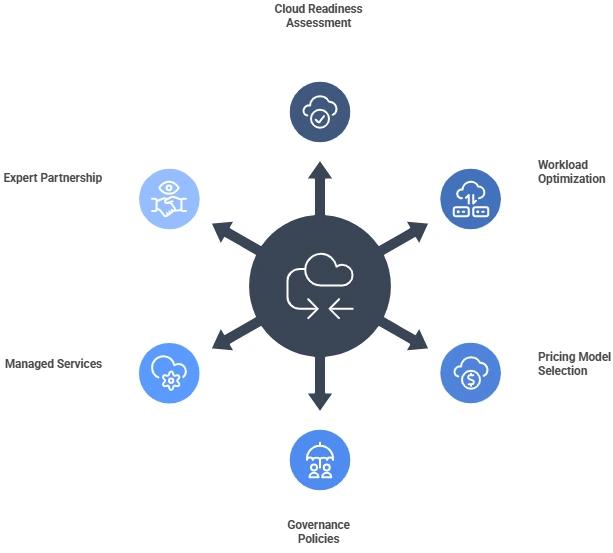
1. Start with a Cloud Readiness Assessment
Before a single workload moves, understand what you're working with. Map your applications, their dependencies, their compliance requirements, and their actual resource utilization. This assessment shapes every cost decision that follows.
2. Choose the Right Migration Strategy Per Workload
Not every application should be migrated the same way. Lift-and-shift minimizes upfront effort but leaves cost optimization for later. Re-platforming improves efficiency but takes longer. Modernization delivers the most cloud-native benefit but requires the most investment. Match the strategy to the workload; don't apply one approach across the board.
3. Pick the Right Cloud Pricing Model
- Pay-as-you-go: Maximum flexibility for variable or unpredictable workloads
- Reserved instances: Lower unit cost for predictable, stable workloads, typically 30–60% cheaper than on-demand pricing
- Spot instances: Lowest cost for fault-tolerant, interruptible workloads
4. Build Governance In from the Start
Establish cloud governance frameworks before migration completes: budget alerts, provisioning policies, tagging standards for cost attribution, and access controls. Governance applied retroactively costs more than governance built in.
5. Plan for Disaster Recovery as a Day-One Requirement
DR is not optional infrastructure. Design your recovery architecture alongside your migration architecture, validate it with drills, and ensure your RPO and RTO objectives are tested — not assumed.
6. Use Managed Services to Reduce Operational Overhead
Managed cloud services let your team focus on what matters to the business rather than infrastructure maintenance. The operational cost savings often offset the service cost within the first year.
How Wanclouds Helps Contain Migration Costs
Wanclouds is a multi-cloud managed service provider with over 1,000 migrations and disaster recovery implementations delivered across IBM Cloud, AWS, GCP, and Azure. Our approach is built around reducing the hidden costs, not just the visible ones.
Migration as a Service: End-to-end migration support from assessment through go-live, including VMware-to-cloud-native conversion that eliminates the need to re-architect legacy workloads before migrating them.
Backup and Disaster Recovery as a Service: Fully managed DRaaS with cross-region replication, automated failover and failback, 24×7 monitoring, and compliance-ready architecture. DR environments established in days, not months, at a fraction of the cost of a secondary data center.
Cost Optimization as a Service: Continuous cloud cost visibility, rightsizing recommendations, and idle resource detection to prevent the 20–50% overspend that typically follows migration.
AI-Powered Infrastructure Operations: Wanclouds AI provides natural-language interaction with your infrastructure, autonomous root cause analysis, continuous compliance posture monitoring, and cross-domain correlation across cloud, on-prem, network, and security, dramatically reducing the operational complexity of managing hybrid and multi-cloud environments post-migration.
To get started, fill out our request form or contact our sales team at [email protected].