
In today’s digital-first business environment, downtime is not an option. Whether caused by a natural disaster, hardware failure, ransomware attack, or human error, each minute offline can translate to lost revenue, brand damage, and regulatory penalties. This is where Disaster Recovery as a Service (DRaaS) comes in—a powerful, cloud-based solution that ensures you’re never caught off guard.
In this guide, we’ll break down what DRaaS is, compare it with Backup as a Service (BaaS), and walk you through how to select the right disaster recovery as a service provider for your enterprise.
What Is Disaster Recovery as a Service (DRaaS)?
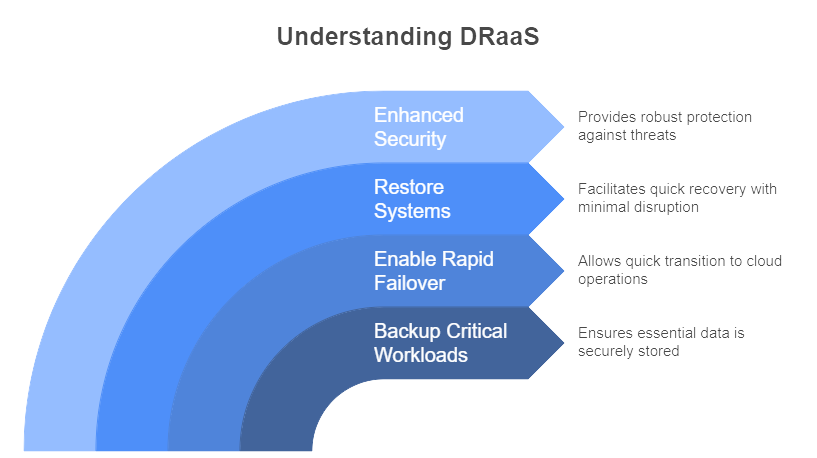
DRaaS is a cloud-hosted solution where a third-party provider replicates and maintains your organization’s IT infrastructure (servers, storage, applications) in a remote environment. In the event of a disaster affecting your primary site, failover occurs and operations continue on the provider’s infrastructure until your systems are restored.
These vendor-managed environments are often geographically distributed to reduce the risk of localized failures. Some models charge on demand, while others work on a retainer or subscription basis under defined SLAs.
Key components of DRaaS include real-time or near-real-time replication, automated failover orchestration, regular testing, and designated recovery workflows.
How Does DRaaS Work?
With DRaaS, your servers, applications, and storage are continuously replicated to a secure cloud environment. Replication may be real-time or near real-time, depending on your recovery point objectives (RPOs).
When an outage or disruption occurs, failover is triggered, and your workloads immediately run from the cloud. Once your on-premises systems are restored, workloads are transferred back seamlessly through failback processes.
Core features include:
- Blueprint & configuration replication (not just data)
- Cross-region / cross-cloud restore mobility
- Automated failover & failback orchestration
- Single pane of glass for unified visibility and control across clouds
- Support for hybrid, multi-cloud, and on-prem workloads
This process is fully managed, monitored, and automated, giving businesses peace of mind that downtime won't derail operations.
Key Benefits of Disaster Recovery Service
1. Enhanced Security & Data Protection
Top DRaaS providers implement advanced security features:
- End-to-end encryption
- Role-based access controls
- Compliance with industry standards (HIPAA, GDPR, etc.)
This ensures sensitive business data remains protected even during a crisis.
2. Minimal Downtime = Business Continuity
With managed DRaaS, you can recover your systems within minutes, not days. Automated failover and failback processes help you maintain:
- Operational continuity
- Customer trust
- Productivity during disruptions
3. Lower Costs vs. On-Prem Infrastructure
Setting up a full Disaster Recovery environment in-house is expensive. Disaster Recovery Service offers:
- Pay-as-you-go pricing
- No hardware investment
- Fewer IT resources needed
Perfect for small and mid-sized businesses looking to stay secure on a budget.
4. Scalable & Flexible for Any Business
As your infrastructure grows, DRaaS can scale alongside it. Whether you're protecting:
- A handful of workloads
- Or a complex hybrid cloud setup
You can easily adjust your DR plan to meet new demands.
DRaaS Features to Look For
| Feature | Why It Matters |
|---|---|
| Automated Backup | Keeps data synced continuously without manual input |
| Failover/Failback | Ensures seamless transition during and after disasters |
| Testing & Compliance | Regular drills help validate your recovery plans and regulatory readiness |
| Real-Time Monitoring | Allows IT teams to spot and respond to threats before they escalate |
Steps to Successfully Implement Disaster Recovery Service
- Assess Your Business Risks: Identify critical systems and potential threats (ransomware, outages, etc.)
- Define Your RTO & RPO
- RTO (Recovery Time Objective): Max acceptable downtime
- RPO (Recovery Point Objective): Max acceptable data loss
- Choose a Trusted DRaaS Provider: Look for expertise, scalability, and proven uptime.
- Configure & Deploy Your DR Environment: Set up replication and failover with your provider.
- Test & Optimize Regularly: Schedule tests and adjust your strategy based on findings.
BaaS vs DRaaS: What Sets Them Apart?
While Backup as a Service (BaaS) and DRaaS both aim to protect data, they differ in scope, speed, and outcomes.
| Feature | BaaS (Backup as a Service) | DRaaS (Disaster Recovery as a Service) |
|---|---|---|
| Scope | Data backup (files, databases) | Full infrastructure + data + application failover |
| Recovery Speed (RTO / RPO) | Usually slower (hours to days) | Faster (minutes to near-zero) |
| Failover capabilities | No automatic failover | Automated or semi-automated failover to DR site |
| Cost | Lower (mostly storage) | Higher (compute, networking, orchestration) |
BaaS may suffice for organizations with low uptime requirements or simple workloads. But if your business demands continuity and fast recovery—even for mission-critical services—DRaaS is the smarter choice.
Choosing the Right Disaster Recovery Service Provider
When evaluating providers, consider:
- Scalability: Will the solution grow with your business?
- Security: Are they compliant with data protection standards?
- SLAs: What’s the guaranteed uptime and recovery time?
- Support: Is 24/7 assistance available during an actual disaster?
Best Practices for DRaaS Success
- Update your recovery plans as your business evolves.
- Run tests regularly to validate your setup
- Train your staff on DR protocols
- Track system performance and review reports
- Maintain open communication with your Disaster Recovery service provider
Start Protecting Your Business with Wanclouds DRaaS
At Wanclouds, we understand how vital uptime and data security are to your business. Our Disaster Recovery as a Service solution is:
- Secure and compliant
- Rapidly deployable
- Affordable and scalable
Get in touch today at [email protected] or visit our website to see how we can tailor a Disaster Recovery plan just for you.