
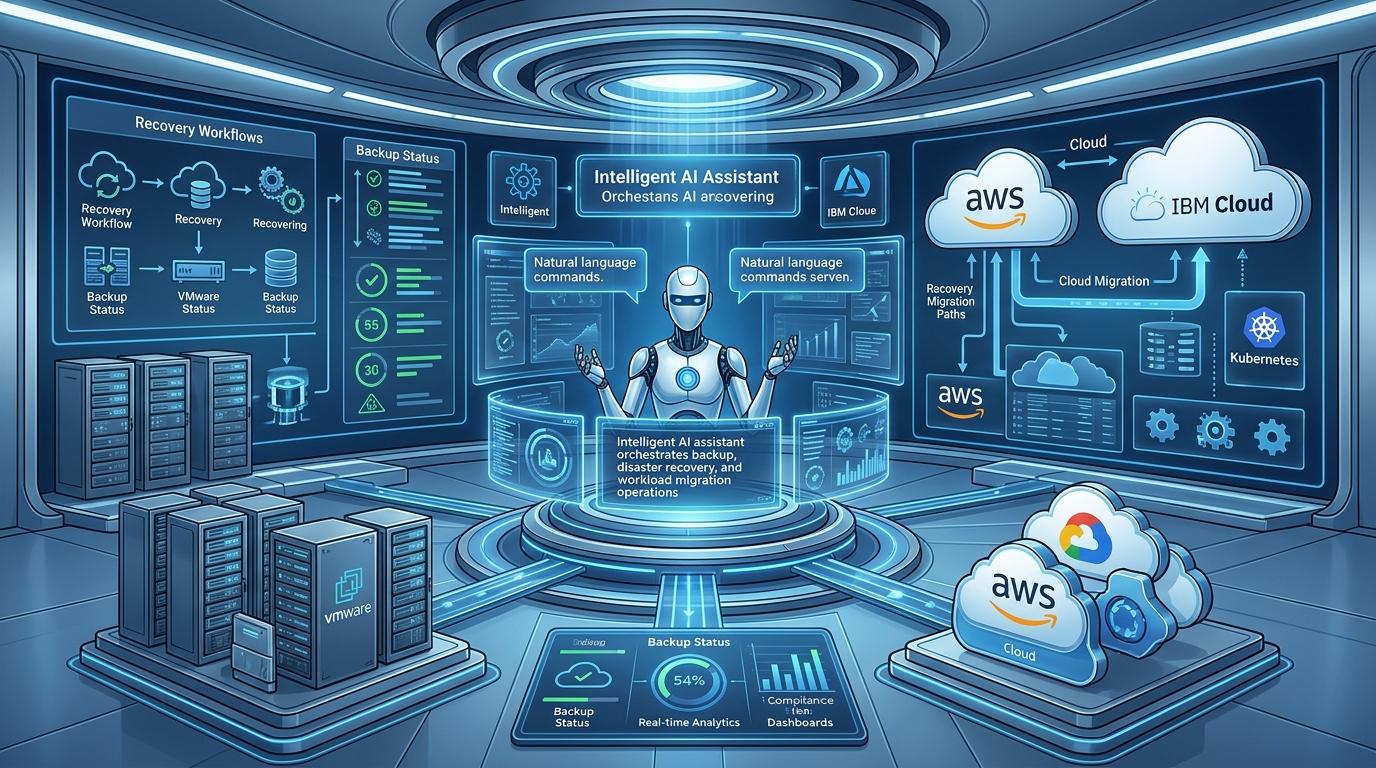
Disaster Recovery Has a People Problem
According to the Uptime Institute's 2023 Annual Outage Analysis, the proportion of major IT outages costing over $100,000 grows every year. What is behind most of those outages? Not technology failures alone, but human error, slow manual response, and fragmented recovery processes account for a significant share of preventable downtime and extended recovery times.
The uncomfortable truth is that most organizations have invested heavily in backup infrastructure but very little in making that infrastructure fast, consistent, and reliable to operate under pressure. When a real incident strikes at 2 AM, the quality of your disaster recovery depends less on the tools you have and more on whether the right person, with the right knowledge, can execute the right steps in the right order, fast enough to matter.
That dependency is the core weakness of traditional disaster recovery. And in 2026, artificial intelligence is eliminating it.
This article explores how AI-powered backup, disaster recovery automation, and workload migration are changing what is possible, and what organizations need to understand to build a resilient, modern DR strategy.
What is Disaster Recovery Automation?
Disaster recovery automation is the use of software to execute, orchestrate, and validate recovery processes without or with minimal human intervention. Rather than relying on engineers to manually work through runbooks during an incident, automated DR systems trigger predefined workflows, coordinate actions across systems, and restore services according to established recovery objectives.
At its core, DR automation addresses three fundamental limitations of manual recovery:
Speed. Automated systems execute recovery steps in seconds. Human teams, even experienced ones, take minutes to assess the situation, communicate, coordinate, and act, minutes that compound into hours of downtime.
Consistency. Manual recovery is only as good as the person running it. Automation applies the same steps, in the same order, every time, eliminating the variability that causes recoveries to fail or take longer than planned.
Auditability. Automated systems log every action taken during recovery automatically, creating a complete audit trail without requiring anyone to reconstruct what happened after the fact.
These advantages make DR automation not just operationally valuable but a compliance necessity for organizations in regulated industries where recovery procedures must be documented, tested, and provably effective.
How AI Takes Disaster Recovery Automation Further
Traditional DR automation executes scripts. AI-powered disaster recovery thinks.
The distinction matters enormously in practice. Script-based automation is only as good as the scenarios it was written for. When an incident falls outside those predefined parameters — when the failure is unexpected, multi-layered, or spans environments the scripts were not designed to handle, automation breaks down, and humans are back to improvising.
AI-driven disaster recovery addresses this limitation by bringing intelligence to the recovery process itself:
Autonomous Root Cause Analysis
When an incident occurs, the first challenge is understanding what actually went wrong. In complex hybrid environments, a symptom in one layer — an application timeout, say — might have its root cause in a completely different layer: a network configuration change, a storage bottleneck, or a security policy violation.
AI systems analyze signals across infrastructure, application, network, and security layers simultaneously, correlating events to identify the true root cause rather than the surface symptom. What previously took experienced engineers hours of log-diving can happen in seconds, automatically, without anyone having to be paged.
Predictive Incident Detection
The most effective disaster recovery is the kind that prevents the disaster from happening in the first place. AI-powered monitoring continuously learns the normal behavior patterns of your infrastructure, CPU usage curves, network traffic profiles, backup completion windows, and flags deviations before they escalate into outages.
This shift from reactive to predictive operations is one of the most significant contributions AI makes to resilience. Teams are notified of emerging risks while there is still time to act, rather than scrambling to recover after the fact.
Natural Language Backup and Recovery Orchestration
Perhaps the most transformative capability AI brings to backup and DR is the ability to interact with infrastructure in plain language. Rather than navigating complex consoles or executing scripts, operations teams can issue natural language commands and receive contextual responses:
- "What caused last night's database outage?"
- "Which systems don't have an active backup policy?"
- "Restore the production environment to its state before this morning's configuration change."
- "Give me an executive summary of our backup compliance status."
This natural language interface removes the skills barrier that makes traditional DR tooling dependent on specialists. Any team member can query infrastructure health, initiate recovery workflows, or assess compliance posture without needing to know which tool to open, which script to run, or which engineer to call.
Continuous DR Testing and Validation
Manual DR drills are expensive, disruptive, and infrequent. Most organizations test their recovery plans quarterly at best, which means plans can drift out of alignment with the actual infrastructure for months before anyone notices.
AI-driven systems enable continuous, automated validation of recovery plans, checking that backup policies are active, recovery procedures are executable, and target environments are correctly configured. Issues are surfaced and flagged before an actual incident, not discovered during one.
The Unique Challenges of Backup and DR in Multi-Cloud Environments
Hybrid and multi-cloud infrastructure introduces complexity that traditional backup and DR tools were simply not designed for. Understanding these challenges is the first step toward building a strategy that actually holds up under pressure.
Fragmented Tooling and Visibility
Most enterprise environments run a patchwork of backup tools, one for VMware, another for cloud-native snapshots, a third for container workloads, perhaps a legacy solution still protecting on-premise systems. Each operates independently, applies different policies, and reports to a different console.
When an incident spans multiple environments, as real-world incidents increasingly do, coordinating recovery across these tools is chaotic. There is no single view of what is protected, what is not, and what needs to happen first.
Inconsistent Backup Policies
Without a unified control plane, backup policies are applied inconsistently. A critical VM in your on-premise datacenter might have hourly snapshots, while an equivalent workload in a public cloud environment has daily, or none at all. These gaps are rarely discovered until recovery is attempted, and the data is not there.
The Complexity of Workload Migration During Recovery
One of the most operationally risky scenarios in modern IT is migrating workloads between environments during or after an incident, moving from on-premise to cloud, from one cloud region to another, or from legacy infrastructure to modernized targets. Dependencies get missed. Network configurations are wrong. Data transfer timelines are underestimated.
The result is extended downtime that compounds the original incident, and a recovery that takes far longer than the plan suggested.
Skills Gaps and Tribal Knowledge
In most organizations, the people who truly understand the DR environment, who know which systems depend on what, which runbooks actually work, and which configurations have drifted, are a handful of senior engineers. When an incident occurs outside business hours or when those engineers are unavailable, recovery becomes improvisation.
This dependency on tribal knowledge is one of the most underappreciated risks in enterprise DR strategies. It does not show up in recovery time objectives. It does not appear in compliance audits. But it consistently makes the difference between a two-hour recovery and a twelve-hour one.
Compliance Pressure
Regulatory frameworks, PCI DSS, HIPAA, NIST, SOC2, DORA, and regional standards — mandate documented, tested, and auditable backup and recovery processes. Organizations that cannot demonstrate effective DR procedures face regulatory fines on top of the operational and reputational costs of the incident itself.
Meeting these requirements manually is labor-intensive and error-prone. Compliance posture can drift between audits without anyone realizing it.
Key Components of a Modern DR Automation Strategy
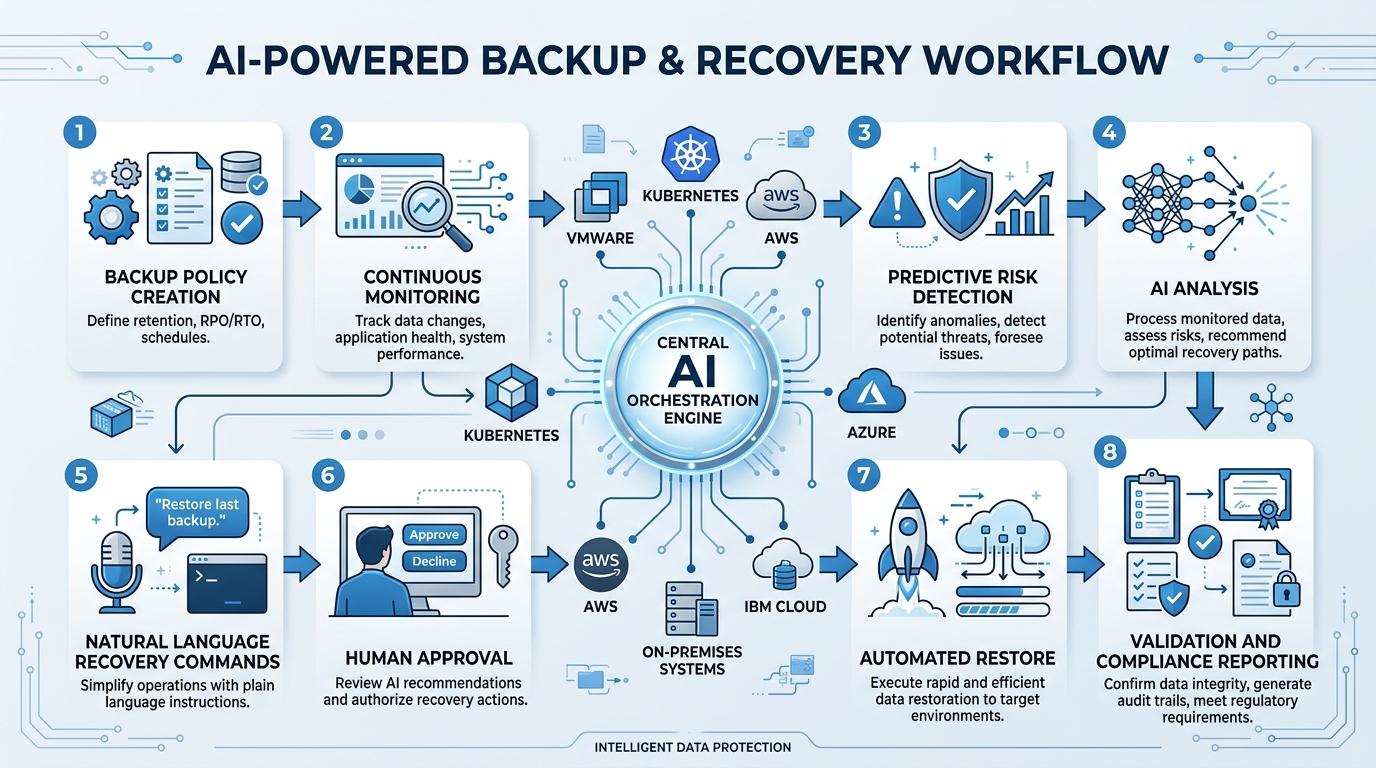
Building an effective DR automation strategy in a hybrid, multi-cloud environment requires more than selecting a backup tool. The following components work together to create a resilient, automated recovery capability:
Unified Backup and Recovery Platform
The foundation of any modern DR strategy is a platform that provides consistent backup coverage and recovery orchestration across all environments — on-premise, private cloud, public cloud, and edge — from a single control plane. Fragmented tooling is the enemy of fast, reliable recovery.
Infrastructure as Code and Configuration Management
Infrastructure as code (IaC) tooling ensures that recovery environments can be stood up quickly and consistently. Integrating IaC with DR automation allows target environments — cloud VPCs, network configurations, security rules — to be provisioned automatically as part of the recovery workflow, rather than requiring manual setup under pressure.
Cross-Layer Monitoring and Alerting
DR automation needs triggers. Monitoring platforms that provide real-time visibility across infrastructure, application, and network layers — and that integrate with the recovery platform — allow automated recovery workflows to be initiated the moment an incident is detected, rather than waiting for a human to assess the situation and make the call.
ITSM Integration
Connecting DR automation with ITSM platforms ensures that ticketing, approvals, and CMDB updates happen automatically during recovery — maintaining governance without adding manual overhead. Audit trails are created automatically, compliance requirements are met without additional effort, and post-incident analysis has a complete record to work from.
Communication and Collaboration Integration
During a major incident, keeping stakeholders informed is as important as executing the recovery. Integrating communication platforms like Slack, Microsoft Teams, and email with the DR automation stack allows status updates to be pushed automatically, keeping executives, business stakeholders, and technical teams aligned without requiring anyone to manually write and send updates.
Workload Migration as a DR Strategy
Cloud migration and disaster recovery are increasingly two sides of the same coin. Organizations that have established cloud-based recovery targets, standing up workloads in a different cloud region or provider in the event of a primary site failure, gain significant resilience advantages over those relying solely on on-premise secondary sites.
AI-powered workload migration brings several capabilities that make this strategy practical and reliable:
Dependency mapping before migration. Before moving a single workload, AI-driven assessment identifies system dependencies, configuration drift, software inventory risks, and migration sequencing requirements, ensuring nothing critical is missed and the migration proceeds in the correct order.
Automated environment preparation. Rather than requiring engineers to manually configure target cloud environments before migration begins, AI-driven automation handles VPC configuration, network setup, and security rule application, reducing the manual overhead that slows migration and introduces errors.
Incremental and policy-driven migration. AI-powered platforms support phased migration strategies, moving workloads incrementally, validating each step before proceeding, and maintaining the ability to roll back if issues are detected, rather than high-risk, all-at-once cutovers.
Post-migration validation. After workloads are moved, automated validation confirms that systems are performing correctly, security configurations are intact, and compliance posture has been maintained in the new environment.
What to Look for in AI-Powered Backup and DR Tools
When evaluating AI-powered backup, disaster recovery, and migration platforms, several criteria distinguish genuinely capable solutions from tools that use AI as a marketing term:
Cross-environment coverage. Does the platform provide consistent backup and recovery capabilities across VMware, public clouds, bare-metal, Kubernetes, and edge environments — or does it require separate tools for different environments?
Natural language interaction. Can operations teams query infrastructure health and initiate recovery workflows in plain language, or does the platform still require specialized knowledge to operate?
Autonomous root cause analysis. Does the platform correlate signals across infrastructure layers to identify root causes automatically, or does it surface isolated alerts that humans still have to investigate?
Memory and learning. Does the platform learn from past incidents and adapt to your specific environment over time, reducing recovery times as institutional knowledge accumulates in the system rather than in people's heads?
Compliance automation. Does the platform continuously monitor backup posture against regulatory frameworks and generate audit-ready evidence automatically, or does compliance reporting require manual effort?
Human-in-the-loop controls. For state-changing operations, restore, migrate, and delete, does the platform require explicit human confirmation before acting, ensuring that autonomous capability does not come at the cost of control?
Integration breadth. Does the platform integrate with your existing monitoring, logging, ITSM, and backup tools, extending what you have, or does it require replacing your current stack entirely?
How Wanclouds AI Addresses These Requirements
Wanclouds AI, deployed as WANDA, an enterprise-grade agentic AI platform, is purpose-built for the backup, DR, and migration challenges outlined in this article. Rather than adding another siloed tool to an already fragmented stack, WANDA operates as a unified intelligence layer across multi-vendor, hybrid, and distributed infrastructure environments.
Natural language backup and recovery. WANDA enables operations teams to orchestrate backup policies, initiate restorations, and query recovery status through conversational interaction, covering Windows and Linux VMs, VMware environments, cloud workloads across AWS, GCP, Azure, and IBM Cloud, Kubernetes clusters, and on-premise datacenters.
Autonomous root cause analysis and correlation. When incidents occur, WANDA performs cross-layer correlation across infrastructure, application, network, and security signals simultaneously, building full incident context automatically and compressing MTTR without manual triage.
Workload migration with AI orchestration. WANDA supports migration of VMs and data from on-premise VMware environments and cloud classic infrastructure to cloud VPC environments, handling dependency assessment, environment preparation, data transfer orchestration, and post-migration validation. For organizations with existing Veeam backup environments, WANDA orchestrates migration directly from those backups, preserving existing investments.
Continuous compliance monitoring. WANDA maps backup and DR procedures against PCI DSS, HIPAA, NIST, SOC2, CIS, ISO, and regional frameworks, including Saudi NCA ECC and DGA — flagging gaps, detecting configuration drift, and generating audit-ready evidence automatically.
Memory-driven operations. WANDA retains institutional knowledge about your environment, past incidents, known failure patterns, configuration baselines, organizational policies, reducing recovery times over time and eliminating dependency on tribal knowledge.
Human-in-the-loop by design. All state-changing operations require explicit user confirmation. Every interaction is logged and audited. No customer data leaves the environment.
Organizations deploying Wanclouds AI typically achieve a 70–80% reduction in incident resolution time, 60–70% reduction in unplanned downtime, and 90% reduction in compliance audit effort, with a payback period of approximately three months.
Key Takeaways
Disaster recovery automation is no longer optional for organizations operating in complex, hybrid, multi-cloud environments. The combination of growing infrastructure complexity, increasing regulatory pressure, and the demonstrated cost of downtime makes a strong, automated DR strategy a business imperative — not an IT project.
As AI capabilities mature, the gap between organizations that have embraced AI-powered backup, DR, and migration and those still relying on manual runbooks and siloed tools will widen significantly. The organizations that recover fastest, maintain compliance most consistently, and migrate most safely will be the ones that have made the shift.
The key principles to take forward:
Unify before you automate. Fragmented tooling cannot be automated into coherence. A unified platform that covers all environments from a single control plane is the prerequisite for effective DR automation.
Design for the 2 AM scenario. Your DR strategy is only as good as its worst-case execution. If recovery depends on a specific person being available, that is not a strategy — it is a risk.
Test continuously, not periodically. Annual or quarterly DR drills are not sufficient in environments that change daily. Continuous automated validation is the only way to maintain confidence that recovery plans will work when needed.
Make compliance a byproduct, not a project. Organizations that treat compliance as a continuous, automated process, rather than a periodic audit exercise, spend less time and resources on it while maintaining a stronger posture.
Embrace AI as an operator, not just an advisor. The full value of AI in DR comes from platforms that can act autonomously, initiating recovery, orchestrating migration, validating compliance, not just surfaces that present data for humans to interpret.
Ready to see what AI-powered backup, disaster recovery, and workload migration look like in practice? Visit wanclouds.ai or reach out at [email protected] to get started.